
MBUX Virtual Assistant Setup and Tips for Chicagoland Drivers
- MBUX Virtual Assistant setup starts with the steering-wheel voice button or the “Hey Mercedes” wake phrase.
- Chicagoland drivers can use MBUX for hands-free navigation, real-time traffic guidance, calls, texts, climate control, and quick vehicle information.
- Mercedes-Benz of Hoffman Estates can provide hands-on MBUX walkthroughs for drivers around Hoffman Estates, Schaumburg, and the northwest Chicago suburbs.
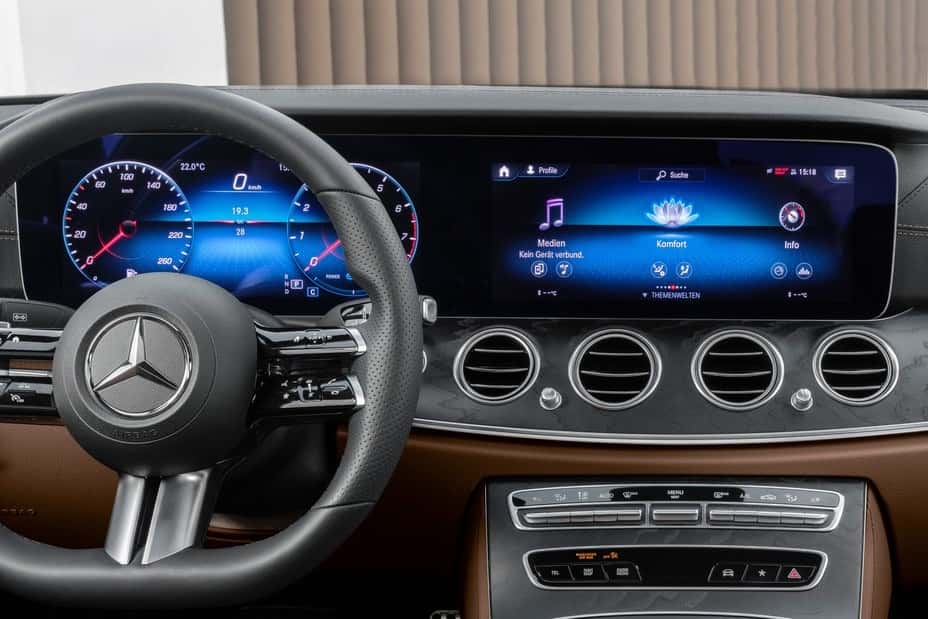
If you’ve ever been stuck on I-90 juggling a GPS app while trying to remember a dinner reservation, you already know why a smarter in-car experience matters. The MBUX Virtual Assistant was built for exactly those moments. Whether you’re grinding through the Eisenhower Expressway at rush hour or running Saturday errands around Schaumburg, it turns your cabin into a responsive, voice-controlled command center. If you have questions before diving in, our team is always available at our contact page.
This guide walks you through MBUX Virtual Assistant setup, practical tips for getting the most out of the system, and local guidance tailored to Chicagoland driving conditions.
What the MBUX Virtual Assistant Can Do for Chicagoland Drivers
The MBUX Virtual Assistant goes well beyond a typical touchscreen interface. At its core, it’s a fully conversational, AI-driven platform powered by Google Cloud’s Automotive AI Agent, built using Gemini on Vertex AI and specially tuned for the automotive industry, with access to Google Maps Platform. Rather than forcing you to memorize rigid commands, the system understands natural speech. Ask it to find a coffee shop near O’Hare, drop the cabin temperature, or read a text message, and it responds intelligently without requiring you to dig through menus or tap a screen.
What makes this especially practical for Chicago-area drivers is the multi-turn dialogue capability. The system retains conversational context across follow-up questions, with dialogue history stored for up to one hour, so you can ask “What’s the fastest route?” and follow up with “How long will this take?” without starting over. For drivers navigating Chicago’s dense traffic, unpredictable weather, and sprawling suburban road networks, that kind of responsiveness genuinely matters.
The system handles a wide range of tasks: real-time navigation, climate and lighting adjustments, communication features, quick vehicle information queries, and more. All accessible without lifting a finger from the wheel.
Getting Started: A Simple MBUX Virtual Assistant Setup Overview
Getting the MBUX Virtual Assistant setup right from day one saves real frustration later. There are two ways to wake the system: press the voice control button on the multi-function steering wheel, or say “Hey Mercedes,” the system’s built-in wake phrase. Hey Mercedes must first be activated in the multimedia system before voice activation works.
To enable it, navigate to Settings > System > Virtual Assistant in the MBUX display. Only adjust these settings when the vehicle is at a standstill. From there, you can confirm Hey Mercedes is turned on and review the available voice options.
Full functionality, including online voice control, requires a Mercedes ME account linked to your vehicle. If you haven’t set that up yet, the MBUX display will prompt you. Taking a few minutes to complete this step unlocks the system’s most capable features, including real-time navigation updates and proactive suggestions based on your driving patterns.
Mercedes-Benz periodically pushes over-the-air updates that expand MBUX capabilities and sharpen voice recognition accuracy. If you’re unsure whether your vehicle has the latest version, the advisors at our service center can check during your next visit.
Hands-Free Navigation for I-90 Commutes and Chicagoland Errands
Navigation is where the MBUX Virtual Assistant really earns its keep on a Chicago-area commute. The Chicagoland highway network, including I-90, I-290, and I-294, is notoriously unpredictable. A system that actively reroutes you rather than reading a fixed path makes a real difference every day.
Getting Real-Time Traffic Guidance Across the Chicago Metro
The MBUX navigation platform uses Google Maps Platform as a data source for real-time traffic information to continuously evaluate your route while you drive. If an accident backs things up on I-90 near Rosemont or construction slows the I-294 corridor, the system automatically suggests alternatives without waiting for you to ask.
You can start navigation entirely through voice. Say “Hey Mercedes, take me to the nearest charging station” and the system handles the rest. Follow-up questions work naturally in the same conversation without needing to restate your destination.
Finding Parking and Points of Interest Around Town
The MBUX Virtual Assistant draws on up-to-date details for 250 million places worldwide, so POI searches are accurate and current. Ask “Hey Mercedes, could you guide me to the nearest fine-dining restaurant?” and the system surfaces relevant results on the display while reading them aloud.
The system also offers proactive suggestions based on learned driving behavior. Over time, it recognizes your routines and can recommend nearby stops that match your patterns, whether that’s a regular coffee stop on your Arlington Heights commute or a familiar route through the I-90/I-290 interchange. Frequently visited places are remembered too, which makes repeat trips faster to kick off.
Using MBUX to Call, Text, and Stay Connected Safely
Illinois law prohibits the use of handheld electronic communication devices while driving, including when stopped at a red light or traffic signal unless the car is in neutral or park. The MBUX Virtual Assistant makes compliance seamless: you can place hands-free calls, have incoming messages read aloud, and dictate text replies without ever touching your phone.
With your phone connected, ‘Call home’ or ‘Text Sarah I’m running late’ executes immediately, so you can stay reachable without reaching for your device.
For Chicagoland commuters managing a lot of communication during the drive, this is a real safety improvement. Keeping your eyes on the road while still staying reachable is exactly the kind of practical benefit the system was designed to deliver.
Adjusting Cabin Settings and Getting Quick Info with Your Voice
Beyond navigation and communication, the MBUX Virtual Assistant handles a wide range of in-cabin preferences through voice alone. Climate control is one of the most-used features. On cold Chicago mornings, rather than fumbling with the touchscreen, just say “Hey Mercedes, set the temperature to 72 degrees” the moment you get in. The cabin warms up hands-free while you focus on the road.
On compatible models, lighting adjustments and other vehicle settings are accessible through voice as well. The system also answers quick informational requests: ask about current weather, your estimated arrival time, or your remaining fuel level, and you get a spoken answer without any screen interaction needed.
Not sure what else the system can handle? Say “Hey Mercedes, what can you do?” and the display will show a list of available commands. It’s a useful shortcut whenever you want to explore features you haven’t tried yet.
Common MBUX Frustrations and Easy Troubleshooting Tips
Even a well-designed system runs into occasional hiccups. Knowing how to work through them quickly keeps the experience smooth. The table below covers the most common issues and straightforward fixes.
| Issue | Fix |
|---|---|
| “Hey Mercedes” not responding | Verify Hey Mercedes is activated in Settings > System > Virtual Assistant |
| Limited voice control functions | Enable online voice control in system settings |
| Unclear recognition or accent issues | Speak naturally and rephrase in everyday language rather than rigid commands |
| Forgotten commands | Say “Hey Mercedes, what can you do?” or tap the (I) info icon in the settings menu |
| Mercedes ME account issues | Confirm account is properly linked to vehicle |
One extra note: for Mercedes ME account problems, confirming the link between your account and vehicle in the app settings resolves most issues quickly.
If problems persist after working through the steps above, a software update usually resolves them, which our service center can apply during your next visit.
Get Expert MBUX Help at Mercedes-Benz of Hoffman Estates
There’s a real difference between using the MBUX Virtual Assistant and actually feeling comfortable with it. If you want a hands-on walkthrough of your vehicle’s specific configuration, the team at Mercedes-Benz of Hoffman Estates is here to help.
Schedule a Tech Walkthrough
Whether you’re setting up MBUX for the first time on a new purchase or working through a persistent question on a certified pre-owned model, our team can walk you through everything in person at our showroom at 1000 W Golf Rd, Hoffman Estates, IL. We serve drivers across Hoffman Estates, Schaumburg, and the broader northwest Chicago suburbs, and we’re familiar with the real-world driving conditions our customers navigate every day.
To schedule a tech walkthrough or ask a question before your visit, contact us online or call us at 847-885-7000. We’re glad to help you get the most out of your vehicle.
Frequently Asked Questions
How do I activate the MBUX Virtual Assistant?
You can wake the system by pressing the voice control button on the multi-function steering wheel or by saying “Hey Mercedes” after the wake phrase has been activated in the multimedia system.
Can MBUX help with Chicagoland traffic?
Yes. The MBUX navigation platform uses real-time traffic information to evaluate routes and can suggest alternatives when congestion, accidents, or construction affect your drive.
What should I do if “Hey Mercedes” is not responding?
Verify that Hey Mercedes is activated by going to Settings > System > Virtual Assistant in the MBUX display, and only adjust these settings when the vehicle is at a standstill.
0 comment(s) so far on MBUX Virtual Assistant Setup and Tips for Chicagoland Drivers